预挂载v4.0.140
Remotion 只会渲染当前帧。
这意味着当视频或其他资产即将出现时,默认情况下不会加载它们。
尽管视频即将出现,但由于 Remotion 只会渲染当前时间,所以尚未加载。
什么是预挂载?
预挂载是提前挂载包含资产的组件的做法,以便在它们出现之前给予资产一些加载时间。
视频被提前挂载,以便给予加载一些时间。 它带有样式 由 定义的时间被冻结在 opacity: 0 使其不可见。useCurrentFrame() 0。
预加载 <Sequence>
使用预挂载时要谨慎,因为挂载更多元素会减慢页面速度。
在 <Sequence> 组件中添加 premountFor 属性以启用预挂载。
传递的数字是您为组件预挂载的帧数。
Premounted.tsxtsxMyComp :React .FC = () => {return (<Sequence premountFor ={100}><Video src ={staticFile ("bigbuckbunny.mp4")}></Video ></Sequence >);};
Premounted.tsxtsxMyComp :React .FC = () => {return (<Sequence premountFor ={100}><Video src ={staticFile ("bigbuckbunny.mp4")}></Video ></Sequence >);};
在 Remotion Studio 中,预挂载的组件以斜线条表示:
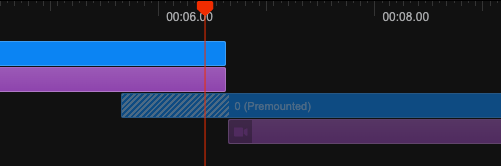
预挂载的 <Sequence> 具有样式 opacity: 0 和 pointer-events: none。
不可能对具有 layout="none" 的 <Sequence> 进行预挂载,因为这样的序列没有容器来应用样式。
使用 <Series> 和 <TransitionSeries>
premountFor 也适用于 <Series.Sequence> 和 <TransitionSeries.Sequence>。
目前还无法对整个 <Series> 或 <TransitionSeries> 进行预挂载。
自定义预挂载组件
您也可以使用公共 Remotion API 自行实现预挂载。
像使用 <Sequence> 一样使用以下组件:
PremountedSequence.tsxtsxReact , {forwardRef ,useMemo } from "react";import {Freeze ,getRemotionEnvironment ,Sequence ,SequenceProps ,useCurrentFrame ,} from "remotion";export typePremountedSequenceProps =SequenceProps & {premountFor : number;};constPremountedSequenceRefForwardingFunction :React .ForwardRefRenderFunction <HTMLDivElement ,{premountFor : number;} &SequenceProps > = ({premountFor , ...props },ref ) => {constframe =useCurrentFrame ();if (props .layout === "none") {throw newError ('`<Premount>` does not support layout="none"');}const {style :passedStyle ,from = 0, ...otherProps } =props ;constactive =frame <from &&frame >=from -premountFor &&!getRemotionEnvironment ().isRendering ;conststyle :React .CSSProperties =useMemo (() => {return {...passedStyle ,opacity :active ? 0 : 1,// @ts-expect-error Only in the docs - it will not give a type error in a Remotion projectpointerEvents :active ? "none" :passedStyle ?.pointerEvents ?? "auto",};}, [active ,passedStyle ]);return (<Freeze frame ={from }active ={active }><Sequence ref ={ref }name ={`<PremountedSequence premountFor={${premountFor }}>`}from ={from }style ={style }{...otherProps }/></Freeze >);};export constPremountedSequence =forwardRef (PremountedSequenceRefForwardingFunction ,);
PremountedSequence.tsxtsxReact , {forwardRef ,useMemo } from "react";import {Freeze ,getRemotionEnvironment ,Sequence ,SequenceProps ,useCurrentFrame ,} from "remotion";export typePremountedSequenceProps =SequenceProps & {premountFor : number;};constPremountedSequenceRefForwardingFunction :React .ForwardRefRenderFunction <HTMLDivElement ,{premountFor : number;} &SequenceProps > = ({premountFor , ...props },ref ) => {constframe =useCurrentFrame ();if (props .layout === "none") {throw newError ('`<Premount>` does not support layout="none"');}const {style :passedStyle ,from = 0, ...otherProps } =props ;constactive =frame <from &&frame >=from -premountFor &&!getRemotionEnvironment ().isRendering ;conststyle :React .CSSProperties =useMemo (() => {return {...passedStyle ,opacity :active ? 0 : 1,// @ts-expect-error Only in the docs - it will not give a type error in a Remotion projectpointerEvents :active ? "none" :passedStyle ?.pointerEvents ?? "auto",};}, [active ,passedStyle ]);return (<Freeze frame ={from }active ={active }><Sequence ref ={ref }name ={`<PremountedSequence premountFor={${premountFor }}>`}from ={from }style ={style }{...otherProps }/></Freeze >);};export constPremountedSequence =forwardRef (PremountedSequenceRefForwardingFunction ,);
这个自定义组件的一个注意事项:在预挂载序列中,仍然可能触发本机缓冲状态。
您的任务是在预挂载序列中禁用触发本机缓冲状态(例如将 pauseWhenBuffering 设置为 false)。
例如,您可以通过使用 React 上下文来实现这一点。
与缓冲状态一起使用
如果您还使用了缓冲状态,<Audio>、<Video>、<OffthreadVideo> 和 <Img> 标签会意识到预挂载,并且在预挂载的 <Sequence> 中不会触发缓冲状态。
否则,这可能会导致在场景尚未可见时暂停播放。